Conductor Cloud shuts down on 20 November: save your work, then choose a Conductor alternative
Conductor Cloud goes read-only on 13 November and starts deleting data on 20 November. What to save this week, how Conductor and Cerevisor compare, and how to move your coding workflows to your own computer.
By the Cerevisor team
Conductor Cloud goes read-only on 13 November and starts deleting data on 20 November 2026. The Mac app winds down in early 2027. Export your data and push your branches this week, then pick a replacement calmly. Below: the dates, a side-by-side comparison with Cerevisor, and how to move.
On 4 November 2026, Conductor announced it is joining Meta. Conductor is a Mac app that runs a team of coding agents side by side, and many people relied on it daily. This piece is for them.
Two words first. A coding agent is an AI program that reads and edits code on request, such as Claude Code or Codex. A harness is the program that runs that agent: it sends the model your request, carries out the actions the model asks for, and decides what the agent may do.
Conductor Cloud shutdown timeline
From Conductor’s own announcement:
| Date | What happens |
|---|---|
| 4 Nov | No new sign-ups or downloads. Pro users keep Pro features for free. |
| 13 Nov | Cloud workspaces go read-only: you can read and export, not send. Subscribers get a refund. |
| 20 Nov | Conductor Cloud shuts down and deletion of Cloud data begins. |
| Early 2027 | The Mac app stops getting updates and winds down. Conductor will then delete all its user data. |
Deletion starts on 20 November; it does not finish that day, and nothing promises the data can be restored. Treat 13 November as your real deadline for any Cloud work in progress.
Protect your Conductor work this week
-
Export the archive
Settings, then Account, then Export data. Keep the file somewhere that gets backed up.
-
Push every unpushed branch
A branch is a named line of changes in your code. Push each Cloud workspace's branch to GitHub before 13 November, so it exists outside Conductor.
-
Move Cloud workspaces to the Mac
Right-click a workspace and choose Transfer to local. It brings the chats along.
-
Save the prompts that worked
Copy your best instructions into a text file. They are what you will rebuild from, in any tool.
Conductor vs Cerevisor: a side-by-side comparison
The biggest difference is where each one sits. In Conductor’s own words: “A harness is the agent runtime that writes code; Conductor is the workspace layer around it.” Conductor runs other harnesses, Claude Code, Codex and OpenCode, and each brings its own agent loop and rules. A local model reaches Conductor through OpenCode: three layers to set up and keep in step.
Cerevisor is a harness itself. For API keys and local models, it runs the agent loop and checks every action against the workflow’s rules, with nothing in between. It can also drive Claude Code, Codex and other harnesses, which follow their own permission settings.
Conductor's strength is git: one branch per task, a diff viewer and pull requests inside the app.
Cerevisor's strength is control: its own agents stay in their folder and follow approval rules, a second agent or a person checks the work, and no usage telemetry is sent to us.
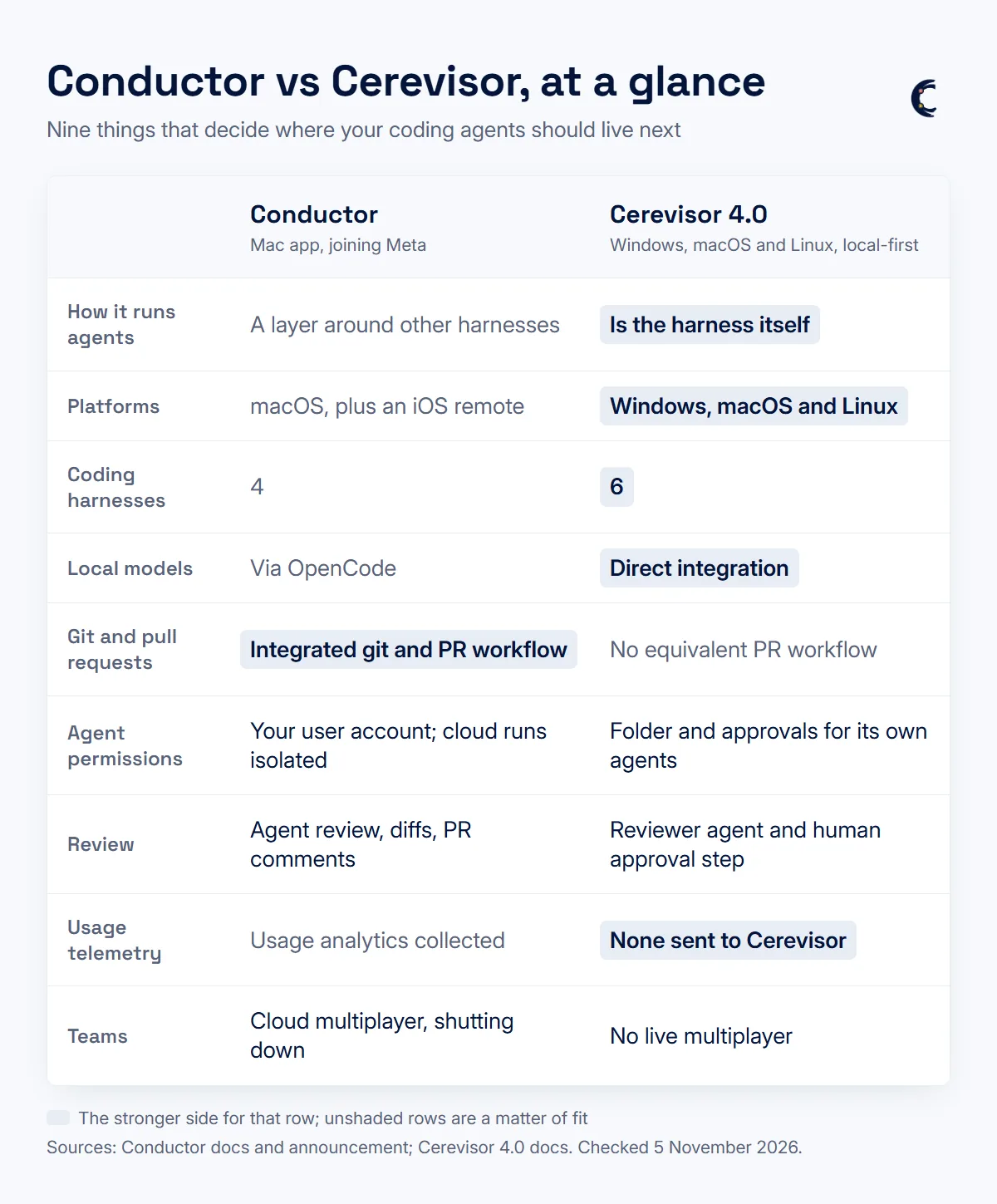
| Conductor | Cerevisor 4.0 |
|---|---|
| Platforms | |
| macOS. An experimental iOS app controls the Mac remotely. | Windows, macOS and Linux, all on the download page. |
| Coding harnesses | |
| Four: Claude Code, Codex, Cursor and OpenCode. | Six: Claude Code, Codex, Cursor, Antigravity, Grok Build and GitHub Copilot (preview), on top of its own agent loop. |
| Keys and local models | |
| Through the harnesses. Local models via OpenCode. | Direct: Anthropic, Gemini and any OpenAI-compatible service, including Ollama, LM Studio and vLLM. |
| Splitting work | |
| One workspace per task, each with its own git branch. | One workflow per job: agents in a drawn order, each with its own role and model. |
| Checking work | |
| Agent and human review: a second agent on the same branch, a diff viewer, pull requests and merges. | Reviewer agent before work counts, and a human step that waits for your approval. No pull requests. |
| Agent permissions | |
| Your user account for local work: agents run "directly on your system without sandboxing". Cloud runs are isolated. | The workflow's folder for its own agents, with three approval settings: Oversight, Auto and Hands-free. |
| Resuming and running without you | |
| Checkpoints undo a turn. Cloud runs continued without you, until 20 November. | Resume after a restart, plus schedules and webhooks. Your computer has to be on. |
| Telemetry, teams and price | |
| Usage analytics in PostHog. Cloud multiplayer, ending 20 November. Free, closed to new users. | No telemetry. No live multiplayer. Free plan; Pro from 15 euros a month, 7-day trial, no card. |
-
Your day was git-first
Conductor did branches and pull requests better. Keep that part in your git host or editor, and use Cerevisor for the agents.
-
You worked with teammates in Cloud
Cerevisor has no shared live workspace. Look for a team tool for that part.
-
You want control and privacy
Mix Claude Code and a local model in one workflow, have the work checked before it counts, and keep everything on your own computer.
How to move from Conductor to Cerevisor
-
Connect the agents you already pay for
On first launch Cerevisor looks for Claude Code, Codex, Grok Build and Ollama and connects the ones it finds. Add anything else in connecting a provider.
-
Add a local model
Install Ollama and pull a model. In Cerevisor: Settings, Providers, Add provider, OpenAI-compatible, base URL http://localhost:11434/v1, Test connection, save. See the local models guide.
-
Rebuild the workflow by describing it
Open the AI Chat Builder (Ctrl or Cmd plus L) and paste your saved prompts, for example "one agent writes the fix and another reviews it". See using the chat builder.
-
Pick a model per agent and turn on review
Put the coding agent on Claude Code or Codex and the reviewer on a cheaper or local model. Then switch on Needs review before it counts. See reviews.
-
Test on a small, known fix
Run it on a test branch, check the changed files and the reviewer's verdict, then commit and open the pull request from your usual git tool.
The order that keeps you safe
Export first, push branches second, choose a replacement third. The Conductor Mac app works into early 2027, so nobody has to switch this week. When you are ready, download Cerevisor, rebuild the one workflow you use most, and run it on a small task with a known answer.
Sources
- Conductor is joining Meta - conductor.build
- Conductor docs: harnesses, isolated workspaces, security and permissions, privacy, FAQ, changelog - conductor.build
- Conductor joins Meta and will shut down its coding-agent cloud - Unite.AI
- Meta acquires Conductor: Cloud shutdown and migration - XenoSpectrum
Written by Kinan Hamwi, Founder of Cerevisor.