Cerevisor 2.0.0: Operator Runs Your Workflows, Providers in One Pane, and Nothing Leaves Your Machine
· v2.0.0
Cerevisor 2.0.0 lets Operator run your saved workflows and build its own tools, replaces the provider setup wizard with a single Provider Hub with one-click sign-in for Codex, Claude and Antigravity, adds workflow branching and image support on every agent type, and cuts the app down to exactly two network calls, one of which you can switch off.
1.9.0 introduced Operator and Progressive Mode. 2.0.0 is the release where they, and everything around them, grow up. Operator can now run your real workflows and build its own tools. Providers moved from a five-step wizard into one pane, with one-click sign-in for the plans you already pay for. You can branch a workflow the way you branch a document. Images finally reach every kind of agent. And a long run of work under the hood means the app is quieter, faster, harder to trick, and, as of this release, makes exactly two network calls, both of which you can see and one of which you can turn off.
Everything still runs on your machine, with your keys and your data staying local.
1. Operator can now do the work, not just draft it
In 1.9.0 Operator checked in on your workspace and drafted things for review. It could suggest, but it couldn’t really do. That changes here.
It runs your actual workflows. Operator can now start one of your saved workflows and run it start to finish while you’re away, through the same engine, with the same provider, on that workflow’s own permission settings. There is no special “Operator mode” for permissions: a workflow that can’t touch your shell when you run it can’t touch your shell when Operator runs it either. The confirmation dialog for Full reach says this plainly, because it’s the whole trade.
It builds its own tools. Operator keeps a private workspace of its own skills, workflows and Powers, separate from yours. It refines them freely there, because nothing in it is yours yet. When it thinks one is good enough to be worth keeping, it puts it through the same review queue as everything else, and you decide. Nothing reaches your real skills, workflows, or Powers without you accepting it.
It keeps a list of what it’s working toward. The agenda survives ticks and restarts, so Operator picks up where it left off instead of rediscovering your goals from scratch each time. Items can be parked or dropped, and you can adopt something it noticed into the list yourself.
It draws a workflow properly or not at all. Drafted workflows now go through a completeness check: every agent has instructions, nothing is orphaned or unreachable, skills and roles are real, connections point somewhere. A draft that can’t pass gets one retry and is then honestly refused. Half-drawn skeletons no longer land in your review queue.
You can watch it think. Each check now streams the steps it’s taking as plain sentences (what it read, what it decided, what it’s running) and keeps the trail so you can expand any past check and see how it got there. Where the model supports streaming its reasoning, you see that too; where it doesn’t, the panel says so instead of pretending.
The panel leads with what it made. The layout is inverted: what Operator produced comes first, what it’s working toward second, and the check-by-check journal is collapsed to one line at the bottom. You had to read a log to know what happened; now there’s something to look at before you need the log.
The budget is one number. The separate self-improvement allowance is gone. Idle work and goal work draw from the same daily cap, so there’s one wall to understand and no second pot to exhaust.
Operator is available on trial and paid plans; the panel, journal, objectives and manual check stay open on every tier.
2. Providers live in one pane now
The five-step setup wizard is gone, replaced by a single Provider Hub: every provider you’ve configured in one rail with live status, one-click expansion to edit any of them in place, and no more stepping forward and back through a flow to change one model.
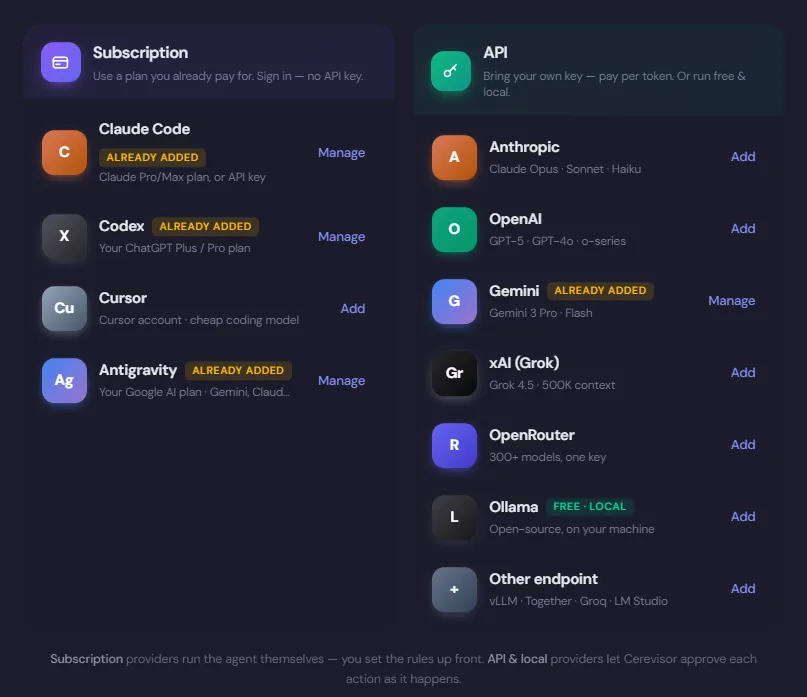
The split is the point. Subscription providers run the agent themselves, so you set the rules up front; API and local providers let Cerevisor approve each action as it happens.
Sign in with the subscription you already have. Codex, Claude and Antigravity sign-in now happen inside Cerevisor. Click sign in, complete it in your browser, and the Hub verifies it for you. No dropping to a terminal, no manual “run test”. Where a CLI asks you to paste a code back, there’s a field for it right there. If something needs a real terminal, there’s one embedded in the app as a fallback.
Model pickers you can actually search. Every model picker (Hub defaults, per-agent overrides, the chat builder) is the same searchable list, with reasoning-effort chips alongside. Agent pickers keep enough room to show real model rows instead of collapsing to a scrollbar.
Reasoning effort per scope. System, chat, and now background each carry their own effort setting rather than one global dial.
A background model. Memory consolidation, Operator checks, retrospectives and other housekeeping can now be pinned to a specific provider and model, typically a cheap or local one, while your workflows keep the app default. “Same as system” is the default and is exactly today’s behavior. If you pin something and later disable or delete it, background work quietly falls back rather than breaking.
This release also fixes a bug that made background work fail outright for some setups: credentials are stored with their keys in the OS keychain, and the background resolver was reading them without the key, so a keyed OpenAI-compatible default made unauthenticated calls, and keyed Anthropic or Gemini credentials were skipped as if they had no key at all. If memory consolidation or Operator checks were failing for you with an authentication error, this was why.
3. Branch a workflow
You can now branch a workflow the way you’d branch a document: from an agent, from the control bar, or by asking the chat builder for it.
A branch is a genuine copy: its own agents and connections, its own subfolder on disk, its own copies of the input and output .md files, and its own session history re-keyed so the two don’t share state. The original is untouched. Branches carry their lineage, which is how they find the secrets that belong to them (see below), and how the file scanners know to leave branch folders out of your main folder view.
Branching is blocked while a run is in progress, from the UI and again in the engine, so a stray click can’t fork a workflow mid-flight. You can branch a workflow that has never run: the input files it expects are created empty rather than the branch being refused.
4. Images and attachments reach every agent
Attaching an image used to work only on agents Cerevisor runs itself. On Codex, Cursor, Claude Code and Antigravity, images were silently dropped.
Images now reach those agents too. When the provider supports images directly, Cerevisor sends them that way. Otherwise, it saves attachments as files the agent can read.
The pre-run notice tells you which of the two you’re getting instead of claiming a blanket drop, and attachments now flow through delegated chat-builder turns as well.
5. Nothing leaves your machine
Cerevisor has always promised your data stays local. Two things quietly contradicted that, and both are fixed.
The interface no longer loads anything from the internet. Fonts came from Google Fonts on every launch, and the code editor (used by the file viewer, the prompt editor, and the memory diff) was fetched from a CDN at runtime, which also meant it simply didn’t work offline. Both are now bundled in the app. With them gone, the interface’s security policy allows no external hosts at all, so this can’t quietly come back.
You can turn the update check off. Settings → Updates now has “Check for updates automatically” (on by default). With it off, Cerevisor makes no network calls at launch whatsoever. The manual “Check for updates” button still works whenever you want it.
And here is the complete list. The user documentation now names every network call the app makes. There are two: the update check above, and, only if you’ve bought a license, a daily validation with our payments provider. That’s it. Calls your agents make to AI providers happen only with the keys and providers you configured, when you run something.
6. Your saves, your secrets, your storage
Saving and exporting can’t be redirected into Cerevisor’s own data. Save, export, and template creation now refuse to write into the app’s internal folders, closing a path where a compromised page inside the app could have aimed a save at Cerevisor’s own files instead of yours. Your regular saves, exports and project folders work exactly as before. The protection follows those folders even if you’ve relocated them.
Credentials and settings move to encrypted storage. Settings and provider credentials that used to sit in a plain, readable file are migrated to encrypted storage automatically on your first launch after updating. There’s nothing to do; that first launch may take a moment longer while it runs.
Branched workflows find their secrets. A branch now automatically resolves the secrets scoped to the workflow it came from and to the folder it lives in, so it doesn’t lose access to secrets it should still have. The secret dialogs and picker also now say plainly what scope means: it’s where a secret is used by default, not a wall, and you can assign any secret anywhere. In the picker, secrets in scope for your current workflow are grouped under “In scope here,” everything else under “Other secrets.”
Revealing a secret is a real confirmation. Reveal and Copy came back, through a confirmation dialog owned by the app itself rather than the page, so a hostile page can’t fake or skip it. The plaintext read paths the page could reach are gone.
Your folder path stops leaking to your phone. Output sent to the companion app has always had the workspace path stripped out of it. On macOS, and anywhere your project folder is reached through a symlink, that stripping silently missed, because the app compared against the resolved path while agents had written the unresolved one. Labels and output text could reach the phone with your real folder path in them. Both spellings are now stripped.
7. Turn limits you set, instead of ones you didn’t
Cerevisor shipped with invisible turn ceilings: 100 turns per run, 25 per agent, and 50 for agents handed to Claude Code. None of them surfaced anywhere. Long runs hit a wall the user never chose and couldn’t see.
All three are off by default now. Settings → Budget → Turn caps is where you opt in: leave it blank for no limit, or enter a number. Unlike the spending caps these work with every provider, local models included, because turns are counted rather than billed. The per-agent cap applies whether Cerevisor runs the agent itself or hands it to Claude Code.
Turn counting is also honest now. Agents running on Claude Code reported several times their real turn count (one turn can produce separate messages for thinking, text and tool calls) and that inflated number was charged against the run’s turn budget, ending runs early for no reason.
8. Runs that used to hang now stop and tell you why
Antigravity sign-in. If agy wasn’t signed in, it printed a login prompt, opened a browser tab, and then waited forever for an answer Cerevisor had no way to give. The run sat there until the watchdog killed it five minutes later with a misleading “produced no output”, and it happened again for every background task, each opening another browser tab, even on workflows that never chose Antigravity. Cerevisor now recognizes that prompt immediately, stops, tells you to sign in from Settings → Providers → Antigravity, and remembers until you do. Signing in clears it instantly; no restart.
The sign-in flow itself is fixed too. Verifying started a second agy, which started its own competing browser sign-in, so the code you were pasting belonged to a process that was about to be killed. That was the “I pasted the code three times and kept getting the login popup” loop. Cerevisor now runs one at a time.
Background tasks now stop when they stall. Memory updates, summaries and planning on Codex or Claude Code now follow your stall timeout setting, just like agent runs.
And a stuck tool gets more benefit of the doubt. For agents on the Claude Agent SDK, a quiet tool call now gets three times the stall watchdog window before the agent is failed, 30 minutes at the default, up from 10, because some tool calls are legitimately slow rather than stuck. Other agent types are unchanged.
Bash-off is now airtight. With shell access turned off, agents on Claude Code could still run simple read-only commands, then abruptly lose the tool at the first complex one and give up on it mid-run. The shell tools are now removed from the agent’s toolset entirely when you turn bash off, so it plans around the absence from the first turn.
9. A quieter, faster app
An idle canvas now holds completely still. Pulsing agent glows, breathing skill slots, drifting frame sheens, flowing route dashes: each looked harmless, and together they kept the graphics card busy at 40-80% while the app sat doing nothing, because any looping animation forces the whole window to be recomposited sixty times a second. Everything that moved for decoration now moves only while something is actually running. Running workflows still glow, pulse and flow.
Startup and saving got much lighter. The settings store is served from memory instead of re-read from disk, undo history and session stores are cached and trimmed to what changed, and terminal output from Antigravity is cleaned incrementally rather than re-processed from the beginning on every chunk.
10. Smaller things you’ll notice
- Run does what it says. The pre-run input panel is now opt-in per workflow. Pressing Run on a configured workflow just runs it. Turn on the Input chip next to the workflow name if you want to compose input each time.
- One question at a time. The chat builder used to ask several questions at once, stacking cards until the first one scrolled off the top. Now it asks them one at a time, with earlier answers collapsing to a line you can tap to change.
- The chat box is always typable. It used to be disabled while a build was in progress, precisely when you most want to say “stop” or “actually, do it this way.” Type any time: Progressive folds it in as steering, and the classic builder offers to stop or keep what it has.
- Six kinds of run events that never reached the interface now do, and error messages that used to leak internal reasoning text now explain what actually happened.
- The mobile companion fixes monospaced text rendering differently across platforms.
The short version
| Feature | In one line |
|---|---|
| Operator v2 | Runs your real workflows on their own permissions, builds its own private tools, keeps a persistent agenda, shows its steps live, and leads with what it produced. |
| Provider Hub | One pane replaces the setup wizard; one-click subscription sign-in for Codex, Claude and Antigravity; searchable model pickers; per-scope reasoning effort. |
| Background model | Pin memory, Operator and housekeeping to a cheap or local model; also fixes a keychain bug that made background work fail with authentication errors. |
| Workflow branching | Branch a workflow into a real copy (own folder, own files, own session, own lineage) from the canvas or the chat builder. |
| Images everywhere | Attachments now reach Codex, Cursor, Claude Code and Antigravity agents, natively where supported and by file handoff otherwise. |
| No internet in the UI | Fonts and the code editor are bundled instead of fetched; the interface’s security policy now permits no external hosts. |
| Update-check consent | Turn the launch-time update check off and Cerevisor makes no network calls at startup. The docs list every call it does make. There are two. |
| Save/export hardening | Saves, exports and template creation can no longer be redirected into Cerevisor’s own internal folders. |
| Encrypted storage | Credentials and settings move from a plain file to encrypted storage automatically on first launch. |
| Vault scope | Branches inherit their parent workflow’s and folder’s secrets; scope is labeled everywhere it’s shown; Reveal and Copy return behind an app-owned confirmation. |
| Phone path leak | Workspace paths sent to the companion app are stripped even when the folder is reached through a symlink, which was previously missed on macOS. |
| Turn caps | Three invisible turn ceilings removed; opt into your own in Settings → Budget. Claude Code turn counts are now accurate. |
| No more silent hangs | Signed-out Antigravity stops immediately instead of waiting forever; background tasks finally get a stall watchdog; slow-but-working SDK tools get 3x the window. |
| Quiet at idle | Decorative animations run only while something is running, for 40-80% less GPU on an idle window. |
| Run runs | The pre-run input panel is opt-in; the chat builder asks one question at a time and never locks its input box. |
Cerevisor keeps your data on your own computer. No tracking, no phoning home. Auto-updates ship to everyone, on every plan.